Product
One process for everyone involved in a ticket.
VerwaltKlar is built around roles: the office, the owner, the tenant and the tradesperson each see exactly the part of the process that concerns them. Underneath it is always the same ticket, presented differently.
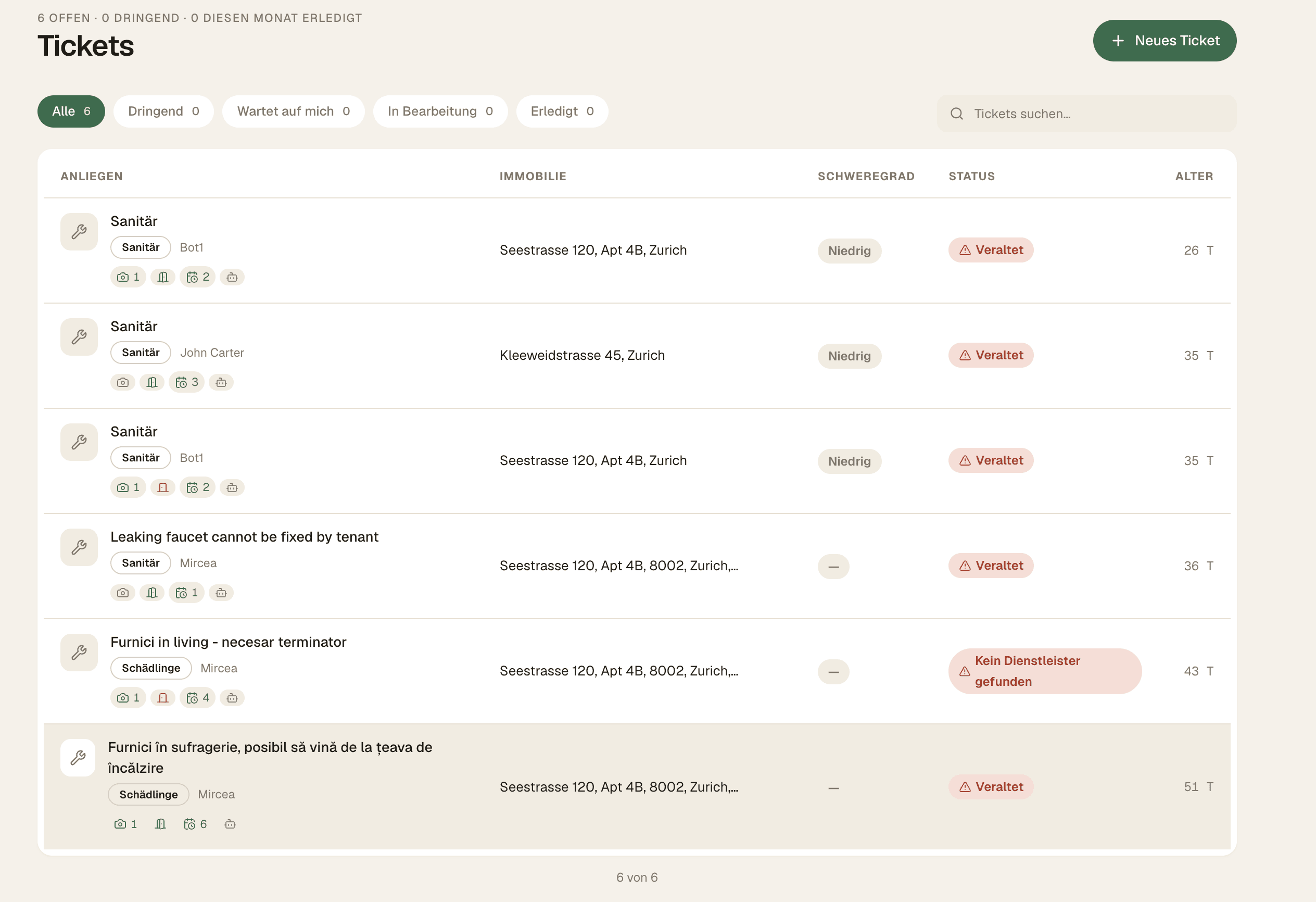
For the property manager
The portfolio in one place, not across twelve spreadsheets.
The admin interface is the day-to-day workspace: what's open, what's urgent, what's waiting on a decision.
- 01
Dashboard overview
Open, urgent and in-progress tickets across the whole portfolio, with the age and status of each case.
- 02
Lease lifecycle
Upload a lease, the data is extracted, and the tenant is invited automatically and onboards themselves.
- 03
Property and asset register
Buildings, units and assets as first-class records — the basis for matching, history and reporting.
- 04
Ticket oversight
Every case with its category, photos, history, assigned tradesperson and availability windows.
- 05
Cost liability pre-assessed
The AI compares every report against the lease's liability clauses and proposes whether the owner or the tenant pays. Approve it or correct it — the decision stays in the office.
- 06
Deadlines with escalation
Every severity level carries a response window. When it lapses the system speaks up on its own — no case quietly sits still.
- 07
Lease review cycle
Leases come back for review on a schedule, and every change is recorded as an immutable prior state.
- 08
Profile completeness
A score shows where data is missing, so matching and reporting don't fail on gaps.
- 09
Owner-facing reporting
Reports you can hand over without assembling them by hand first.
For the tenant
No app, no portal, no password.
Tenants report in the messenger they already use. The conversation is guided so the report ends up complete without anyone having to chase details.
- 01
Report in a chat
A guided Telegram conversation — multilingual, no install and no explanation needed.
- 02
In their own language
Tenants write the way they speak. The report is translated automatically so the office and the trade read it in theirs.
- 03
Photos straight from the chat
Images are attached to the ticket and immediately available to the office and the tradesperson.
- 04
Give availability
The tenant picks windows when someone is home, removing the most common cause of failed appointments.
- 05
Track status
Follow-up questions and status changes arrive in the same chat thread.
- 06
Rate the work
A short rating on completion — the basis for the quality of future provider matching.
- 07
Transparent from the start
The chat's welcome message explains that the details are shared with the property manager.
For the tradesperson
Jobs that can actually be scheduled.
A ticket only reaches a business once it carries enough: what's broken, where, how urgent, when someone is home — photos included.
- 01
Trusted trades first
The property manager brings their own tradespeople, and those are suggested first.
- 02
The network as a backup
If nobody on the in-house roster fits or responds, the platform network comes into play.
- 03
Location-aware matching
Suggestions account for where a business works and which trades it covers — weighted by proximity, rating and completed cases.
- 04
Access without an account
The business receives a secure, time-limited link to the case. Accepting or declining works without signing up.
- 05
Details only after accepting
Before acceptance: trade, severity and a rough area only. The address and contacts are released afterwards.
- 06
A suggestion, not a dispatch
In this phase a human always coordinates. VerwaltKlar never commissions work automatically.
AI triage
How a ticket gets its priority.
Triage is deliberately legible: it classifies, it doesn't decide. The office sees the assessment and can override it at any time.
- 01
Detect the category
The trade is derived from the text and photos — plumbing, heating, electrical, pests and more.
- 02
Check description quality
If something essential is missing, the chat asks for it instead of producing an unusable ticket.
- 03
Assess urgency
From 'can wait' to 'immediate' — as a visible, explained suggestion that can be overridden.
- 04
Hard escalation for safety
Gas, electricity, escaping water or a security risk are escalated by a fixed rule, regardless of the assessment.
Human approval remains the hard boundary.
- P1 to P4 urgency remains visible and explainable
- Safety hazards follow fixed escalation rules
- Every suggestion can be overridden by the office
Messenger intake
One flow, in the channels tenants already use.
The same guided process works in WhatsApp and Telegram — clear, multilingual and without another tenant app.
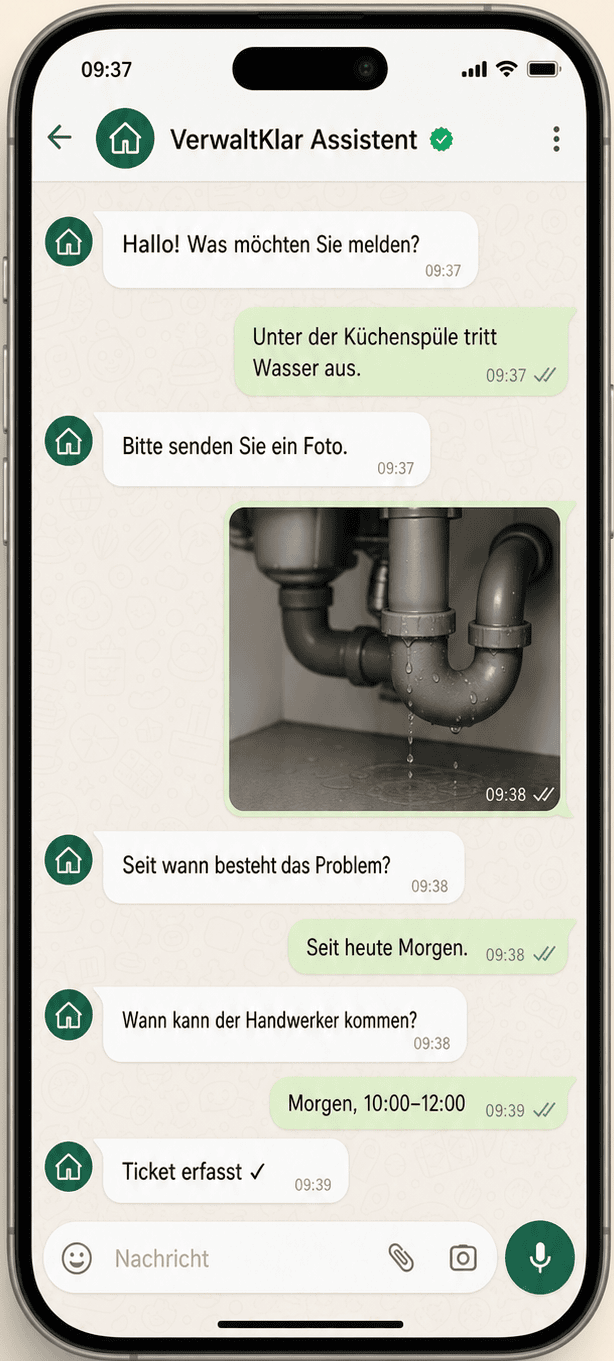
Intake through WhatsApp
Photos, issue details and availability are collected step by step inside the familiar chat.
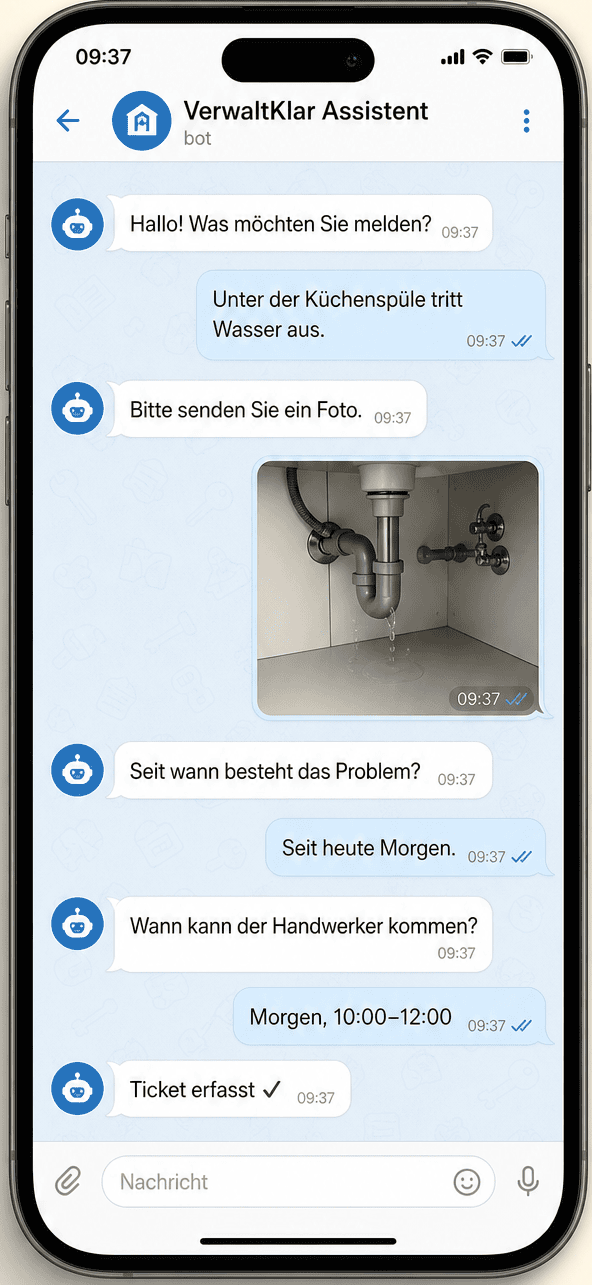
Intake through Telegram
In Telegram too, a free-form tenant message becomes a complete, schedulable ticket.
Are you a trade business?
There's a dedicated page on how jobs reach you through VerwaltKlar.
See what this looks like in your portfolio.
Bring us your current maintenance process. We will map it to a structured pilot together.